Warning: Undefined array key 2 in /home/naoooooo8/naoya-ono.com/public_html/swift/wp-content/themes/sango-theme-poripu/library/functions/prp_content.php on line 15
Warning: Undefined array key 3 in /home/naoooooo8/naoya-ono.com/public_html/swift/wp-content/themes/sango-theme-poripu/library/functions/prp_content.php on line 18
Warning: Undefined array key 4 in /home/naoooooo8/naoya-ono.com/public_html/swift/wp-content/themes/sango-theme-poripu/library/functions/prp_content.php on line 21
Warning: Undefined array key 2 in /home/naoooooo8/naoya-ono.com/public_html/swift/wp-content/themes/sango-theme-poripu/library/functions/prp_content.php on line 27
Warning: Undefined array key 3 in /home/naoooooo8/naoya-ono.com/public_html/swift/wp-content/themes/sango-theme-poripu/library/functions/prp_content.php on line 30
Warning: Undefined array key 4 in /home/naoooooo8/naoya-ono.com/public_html/swift/wp-content/themes/sango-theme-poripu/library/functions/prp_content.php on line 33
配列の中身をシャッフルする
array.shuffle()Playgroundで実際に見てみると、次のように配列の中身がシャッフルされていることがわかります。
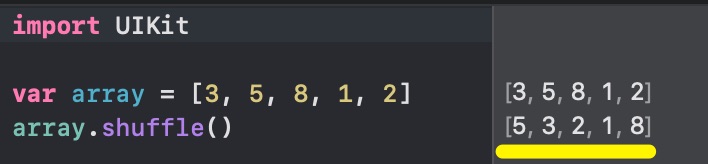
僕はクイズアプリで問題を作成する際や、選択肢を並べる際に使いました。
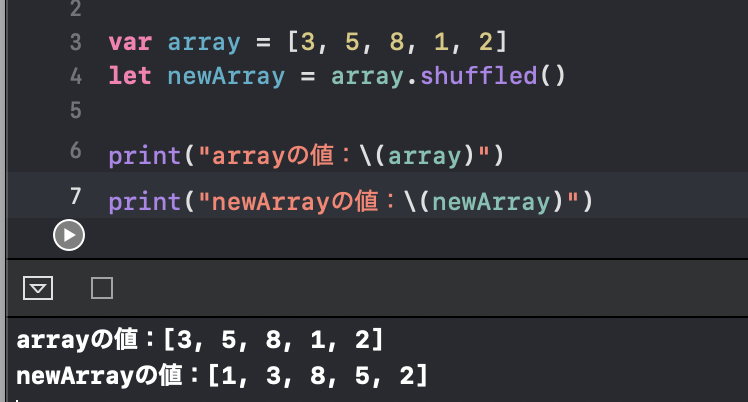
元となる配列は変更せず、シャッフルした配列を新たに作りたい場合
let newArray = array.shuffled()shuffled()メソッドを使えば、元の配列の順序は変えず、新たにシャッフルした配列を作ることができます。