Warning: Undefined array key 3 in /home/naoooooo8/naoya-ono.com/public_html/swift/wp-content/themes/sango-theme-poripu/library/functions/prp_content.php on line 18
Warning: Undefined array key 4 in /home/naoooooo8/naoya-ono.com/public_html/swift/wp-content/themes/sango-theme-poripu/library/functions/prp_content.php on line 21
Warning: Undefined array key 3 in /home/naoooooo8/naoya-ono.com/public_html/swift/wp-content/themes/sango-theme-poripu/library/functions/prp_content.php on line 30
Warning: Undefined array key 4 in /home/naoooooo8/naoya-ono.com/public_html/swift/wp-content/themes/sango-theme-poripu/library/functions/prp_content.php on line 33
Xcodeで以下の警告が出た時の対処法を紹介します。
Plain Style unsupported in a Navigation Item
どういった場合に出るの?
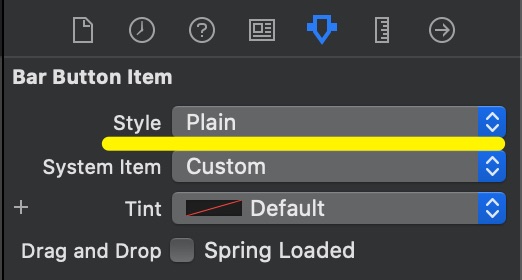
NavigationControllerのBar Button Itemの設定で、Styleを「Plain」にしていると出ます。
警告の内容は?
英語で書かれている通りですが、StyleのPlainがサポートされていないためです。
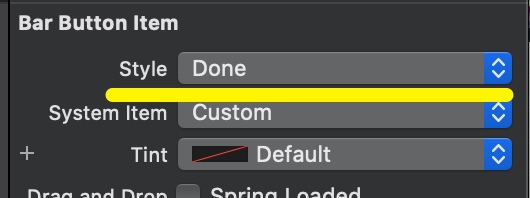
Bar Button Itemのスタイルには以下の3種類ありますが、現状(iOS7以降)では「Done」しかサポートされていないようです。
- Plain
- Bordered
- Done
対処方法
StyleをDoneに変更すれば警告が表示されなくなります。