Warning: Undefined variable $post in /home/naoooooo8/naoya-ono.com/public_html/swift/wp-content/themes/sango-theme-poripu/functions.php on line 12

Warning: Attempt to read property "ID" on null in /home/naoooooo8/naoya-ono.com/public_html/swift/wp-content/themes/sango-theme-poripu/functions.php on line 12

Warning: Undefined array key 3 in /home/naoooooo8/naoya-ono.com/public_html/swift/wp-content/themes/sango-theme-poripu/library/functions/prp_content.php on line 18

Warning: Undefined array key 4 in /home/naoooooo8/naoya-ono.com/public_html/swift/wp-content/themes/sango-theme-poripu/library/functions/prp_content.php on line 21

Warning: Undefined array key 3 in /home/naoooooo8/naoya-ono.com/public_html/swift/wp-content/themes/sango-theme-poripu/library/functions/prp_content.php on line 30

Warning: Undefined array key 4 in /home/naoooooo8/naoya-ono.com/public_html/swift/wp-content/themes/sango-theme-poripu/library/functions/prp_content.php on line 33

【Xcode】警告: warning: Auto Layout Localization: Fixed leading and trailing constraints with a center constraint may cause clipping が出た時の対処法

記事内に商品プロモーションを含む場合があります


Warning: Undefined array key 3 in /home/naoooooo8/naoya-ono.com/public_html/swift/wp-content/themes/sango-theme-poripu/library/functions/prp_content.php on line 18

Warning: Undefined array key 4 in /home/naoooooo8/naoya-ono.com/public_html/swift/wp-content/themes/sango-theme-poripu/library/functions/prp_content.php on line 21

Warning: Undefined array key 3 in /home/naoooooo8/naoya-ono.com/public_html/swift/wp-content/themes/sango-theme-poripu/library/functions/prp_content.php on line 30

Warning: Undefined array key 4 in /home/naoooooo8/naoya-ono.com/public_html/swift/wp-content/themes/sango-theme-poripu/library/functions/prp_content.php on line 33

Xcodeで以下の警告が出た時の対処法を紹介します。

warning: Auto Layout Localization: Fixed leading and trailing constraints with a center constraint may cause clipping.

どういった場合に出るの?

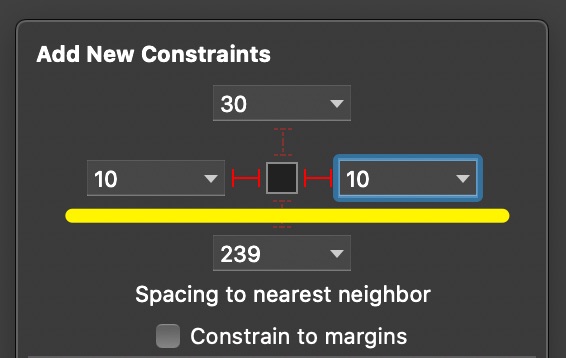
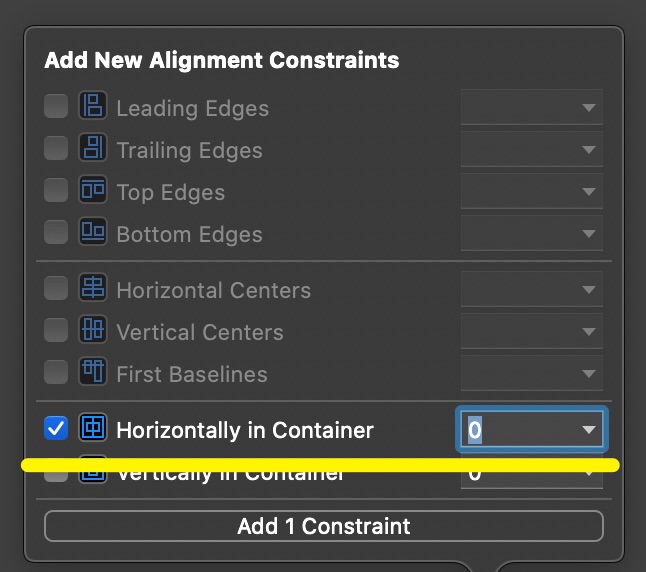
Auto Layoutでセンター寄せにし、かつ左右のconstraintを設定すると発生します。


警告の内容は?

簡単に言ってしまえばラベルのテキストが長いとが見切れてしまうかもしれないという警告。

文字がラベルのサイズを超えない様にフォントサイズを自動調整する方法は以下の記事で以前に紹介しているが、こちらのコードを書いただけでは、警告消えない。
【Swift】UILabelの枠のサイズに合わせてフォントサイズを自動調整する方法

対処方法

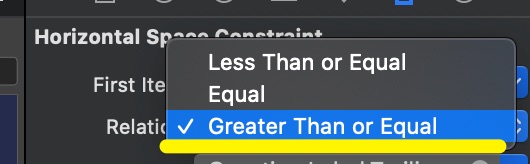
警告を残しておいても問題はないが、どうしても消したい場合は設定したconstraintのRelationの設定を「Equal」から「Greater Than or Equal」に設定すれば良い。

コメントを残す

メールアドレスが公開されることはありません。 ※ が付いている欄は必須項目です

CAPTCHA


Warning: Undefined array key 3 in /home/naoooooo8/naoya-ono.com/public_html/swift/wp-content/themes/sango-theme-poripu/library/functions/prp_content.php on line 18

Warning: Undefined array key 4 in /home/naoooooo8/naoya-ono.com/public_html/swift/wp-content/themes/sango-theme-poripu/library/functions/prp_content.php on line 21

Warning: Undefined array key 3 in /home/naoooooo8/naoya-ono.com/public_html/swift/wp-content/themes/sango-theme-poripu/library/functions/prp_content.php on line 30

Warning: Undefined array key 4 in /home/naoooooo8/naoya-ono.com/public_html/swift/wp-content/themes/sango-theme-poripu/library/functions/prp_content.php on line 33